
How To Combine / Merge Multiple CSV Or Excel Files (For Mac, PC & Linux)
Devin Schumacher is an entrepreneur, internet personality, author, music producer, philanthropist & founder of SERP.
So, allow me make it just one micron less painful for you – by show you how to combine CSVs together in a matter of seconds .
How do i combine multiple files into one file?
Relax! I’m getting there..
Just kidding – i just needed to stuff that keyword phrase to pick up a couple more terms for SEO purposes.
But actually there’s a few ways to do it:
Merge CSVs at the command line (how we are going to do it today)
Merge CSVs with a free csv merge tool I made for ya
Merge CSVs with python
Merge CSVs by smashing them together with hulk hands (not a real method)
In this article I will show you how to quickly & easily combine and merge multiple CSV files into one CSV file for free on a mac using the terminal — but it also works on PCs.
But for all you lazy people, here’s a video:
If you run into any problems – we even created a free tool that you can try.
So follow along, and start combining!
Update: Back in the day I shot a video about how to do this manually on a mac, and it still works. But since then we’ve had a lot of people ask about doing it on a PC.
So we actually just made a tool that combines CSVs for you.
And it’s way faster than the manual method.
And it’s free.
👉 Here’s a link to the tool for all you lazies who don’t wanna read or watch a video: https://serp.co/tools/combine-csv-files/
If this was helpful, subscribe to the yt channel. i’m going to be making a lot more videos that will help you be more productive, faster on a computer, and make your life suck less 🙂
Table of Contents
If you have multiple CSV or Excel files that you need combined, follow this simple process to get them combined in a flash, using the built in “terminal” on your Mac.
👉 Bookmark this FREE SOP (checklist) that you can run anytime you need to combine more CSVs: devin.to/csv-sop
Step 1 – Create a new folder
Create a new folder on your Desktop & put all of your CSV files into the folder.
I will call mine “combine”.
It will look like this:
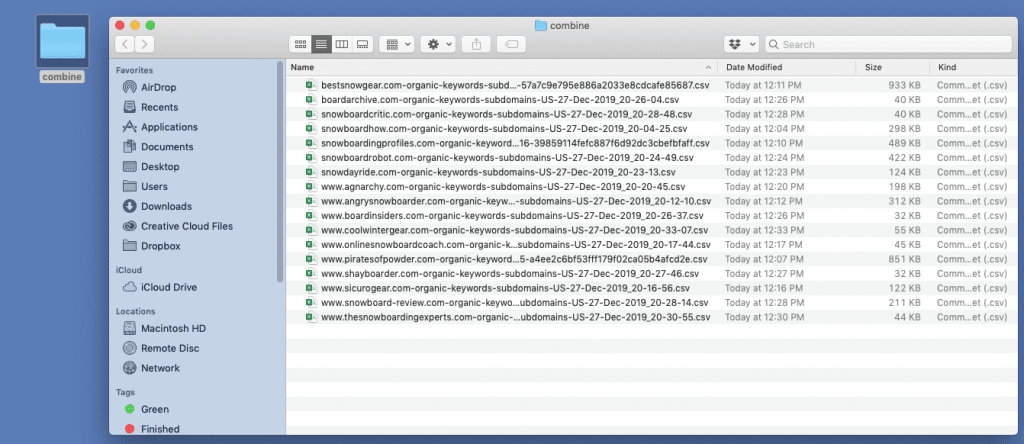
Caution : Everything in this folder will be combined.
Step 2 – Open Terminal (aka “the shell” or “the command line”)
The program “Terminal” is located in your “ Applications ” folder under “Utilities”
Applications > Utilities > Terminal
Open Terminal.
It will look like this:
Step 3 – Print Working Directory
This is a fancy name. Don’t worry about it, just follow the steps.
Type:
pwdHit the
returnkey
`pwd`
It will look like this:
pwd means “print working directory”.
It’s showing you what “directory” (aka folder) you are currently at on your operating system. Don’t worry about it. Just keep following along.
Step 4 – Choose the folder you created
Set your “directory” to the folder you created that has your CSV files in it.
type:
cd /Users/devin/Desktop/combine<== obviously replace “devin” with your name… unless your name is devin.hit the
returnkey
Note : you will need to change your file path so it matches your username & folder name
Step 5 – Merge the files
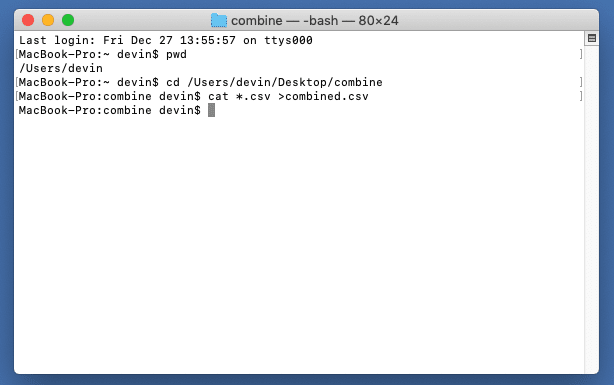
Now you are ready to merge your files.
type:
cat *.csv >combined.csvhit the
returnkey
It will look like this:
Step 6 – Check your folder
If you followed along correctly, you are done!
Inside your folder there will be a file called “combined.csv”, which contains all of your csv files combined together.
Note: you might have to delete the duplicate header columns though.
Just apply a filter to your entire sheet, and sort A-Z on column A and you should see them.
It will look like this:
Final thoughts
If this was helpful for you – subscribe to the yt channel
I’m going to be making a lot more videos with tips that will help save you time, increase your productivity, and basically make you feel like a hacker… or Neo from the matrix. which is always a good thing.
Cheers & stay funky, my friends. 🦩


